Title
NEEVIA
Document Converter
Professional Edition
user’s guide
version 7.5
Table of Contents
Installing and Uninstalling Document Converter Pro
Registering Neevia Document Converter Pro
Neevia Document Converter User Interface
TIFF Fax Optimized Output Format
PNG/BMP/PCX/PSD Output Formats.
Launching Document Converter as a Windows Service
Appendix A: Variables supported by Text / TextBox stamps
License
NEEVIA TECHNOLOGY
ELECTRONIC END USER LICENSE AGREEMENT
For One (1) Computer/Server/Virtual Server
This is an End User License Agreement. This is a contract. If you install this software, you must abide by the terms of this agreement. This license is applicable to all software products sold by Neevia Technology (Neevia). The term software includes upgrades, modified versions or updates. This software is licensed and not sold. Only a personal, non-transferable and nonexclusive right to use the Neevia products is granted to the end user.
The following are definitions that should be noted by the user:
a. SERVER
This is a single computer owned, rented or leased by a single individual or entity on which one or more applications load and execute software in the memory space of that computer. Software is installed on a server for one or more users. All servers must be licensed to utilize Neevia software.
b. VIRTUAL SERVER
This is a single computer or a virtual machine (a software implementation of a machine that executes programs like a physical machine) that is owned, rented or leased by an individual or entity that turns around and rents or leases access to others. The virtual server may have one or more applications on it for the end users to use. The purpose of the virtual server is to give multiple users access to many software programs. All servers must be licensed to utilize Neevia software.
c. DEVELOPMENT
This means that you are programming a specific application or tool that will interact with the software you are licensing from Neevia Technology.
THIS IS A CONTRACT BETWEEN YOU AND NEEVIA TECHNOLOGY. YOU SHOULD CAREFULLY READ THIS LICENSING AGREEMENT AND MUST ACCEPT ALL THE TERMS AND CONDITIONS BEFORE INSTALLING THIS NEEVIA SOFTWARE. BY INSTALLING THE SOFTWARE, YOU ARE AGREEING TO BE BOUND BY THE TERMS AND CONDITIONS OF THIS LICENSE. IF YOU DO NOT AGREE TO THE TERMS OF THIS LICENSE, DO NOT INSTALL THE SOFTWARE, AND DO NOT USE THE SOFTWARE. IF YOU VIOLATE THIS AGREEMENT, YOU WILL BE SUBJECT TO LEGAL ACTION BY NEEVIA TECHNOLOGY.
Subject to the payment of applicable license fees, Neevia Technology grants you a nonexclusive right to use its accompanying Neevia software product and related documents (the Software) in the terms and conditions provided as follow:
LICENSE
Until such time as Neevia Technology has issued a valid serial number to you, you may only use this software for a 90-day trial period. You agree to remove any copies of the software after the expiration of the trial period. No license is issued to you until you are issued a valid serial number.
(a) Home Use:
The primary user of each computer on which the Software is installed or used may also install the Software on one home or portable computer. However another person may not use the Software on a secondary computer at the same time the Software on the primary computer is being used.
(b) Server or Network Use:
You may install or store one (1) copy of the SOFTWARE on a network server or a storage device, such as for backup and archival purposes only. A license for the SOFTWARE may not be shared or used concurrently on different computers.
(c) Operating system or Language versions:
If you receive two or more copies of the Software with different operating systems or language versions, the total aggregate number of computers on which all versions of the Software are used may not exceed the Permitted Number of Computers. You may not rent, lease, sublicense, lend or transfer versions or copies of the Software you do not use, or Software contained on any unused media.
(d) Archiving:
You may make one copy of the Software solely for archival purposes. If the Software is an upgrade, you may use the Software only in conjunction with upgraded product. If you receive your first copy of the Software electronically, and a second copy on media afterward, the second copy can be used for archival purposes only.
You agree to surrender your license(s) if you violate this agreement. If you violate this agreement, you will not receive a refund upon termination of this license. You agree not to utilize our software to violate the copyright of any third parties. If you do violate the copyright of a third party utilizing our software, you agree to hold Neevia Technology harmless and will indemnify Neevia Technology for any such activity even if the violation is unintentional.
COPYRIGHT
The Software is owned by Neevia Technology and/or its suppliers, and is protected by the copyright and trademark laws of the United States and related applicable laws. You may not copy the Software except as set forth in the "License" section. Any copies that you are permitted to make pursuant to this Agreement must contain the same copyright and other proprietary notices that appear on or in the Software.
You may not rent, lease, sub-license, transfer, or sell the Software. You may not modify, translate, reverse engineer, decompile, disassemble, or create derivative works based on the Software, except to the extent applicable law expressly prohibits such foregoing restriction. You may use the trademarks to identify the Software owner's name, or to identify printed output produced by the Software. Such use of any trademark does not give you any rights of ownership in that trademark.
NO WARRANTY LICENSED SOFTWARE (S) - "AS IS"
The Software is provided AS IS. NEEVIA TECHNOLOGY AND ITS SUPPLIERS MAKE NO WARRANTIES, EXPRESS OR IMPLIED, AS TO THE MERCHANTABILITY, QUALITY, NONINFRINGEMENT OF THIRD PARTY RIGHTS, FITNESS FOR A PARTICULAR PURPOSE, AND THOSE ARISING BY STATUTE OR OTHERWISE IN LAW OR FROM A COURSE OF DEALING OR USAGE OF TRADE. THE ENTIRE RISK AS TO THE QUALITY, RESULTS BY USING THE SOFTWARE, AND PERFORMANCE OF THE SOFTWARE IS WITH THE END USER. Some states or jurisdictions do not allow the exclusion or limitation of incidental, consequential or special damages, or the exclusion of implied warranties or limitations on how long an implied warranty may last, so the above limitations may not apply to your or your company.
LIMITATION OF REMEDIES AND LIABILITY
NEEVIA TECHNOLOGY OR ITS SUPPLIERS OR RESELLERS SHALL NOT UNDER ANY CIRCUMSTANCE BE LIABLE TO YOU FOR ANY DAMAGES, INCLUDING BUT NOT LIMITED TO SPECIAL, INDIRECT, OR CONSEQUENTIAL DAMAGES, LOST PROFITS OR LOST SAVINGS, OR FOR ANY CLAIM BY A THIRD PARTY, ARISING OUT OF THE USE OR INABILITY TO USE THE SOFTWARE, EVEN IF NEEVIA TECHNOLOLGY SHALL HAVE BEEN INFORMED OF THE POSSIBILITY OF SUCH DAMAGES, OR FOR ANY CLAIM BY ANY OTHER PARTY.
GENERAL
This Agreement shall be construed, interpreted, and governed by the laws of the State of Florida, excluding the application of its conflicts of law rules. The United Nations Convention on Contracts of the International Sale of Goods, will not govern this Agreement. If any part of this Agreement is found void and unenforceable, it will not affect the validity of the rest of the Agreement, which shall remain valid and enforceable according to its terms.
If you need to redistribute this product with your own software products, you need to contact Neevia and negotiate a separate licensing and royalty agreement.
You may not ship, transfer, or export the Software into any country or used in any manner prohibited by any export laws, restrictions or regulations.
UPGRADES
You must be properly licensed to install upgrades to Neevia Software products. Neevia upgrades replace and or supplement the previous product that formed the basis for your eligibility to for the upgrade. You may use the upgrade only in accordance with the terms of this Agreement. Upgrades may not be separated and used on separate computers.
GOVERNEMENT USERS
For United States government users, the Software and associated Documentation are deemed to be “commercial computer software” and “commercial computer documentation”, respectively pursuant to DFAR 227.7202 and FAR 12.212(b) as applicable.
ENTIRE AGREEMENT
You acknowledge that you have read this Agreement, understand it and agree to be bounded by its terms and conditions. It is the complete and exclusive statement of the Agreement between us, which supersedes any proposal or prior agreement, oral or written, and other communication between us relating to the subject matter of this Agreement.
Introduction
In today’s business environment there is a tremendous need for companies to convert business content to PDF, PDF/A and/or image formats like TIFF, PNG or JPEG. This is apparent by the many requests programmers and IT professionals receive from managers in industries that range from the legal field to the financial and insurance fields. We realized this more than a decade ago and that is when we began to work on the suite of software products that are offered by Neevia Technology. We understand that we live in a PDF world and we set out to create an application that would change the way people view share and work with e-documents.
Neevia Document Converter is a software product that dynamically converts HTML, Microsoft Office 2007, 2010, 2013, 2016, 2019, 365, 2022, Open Office, WordPerfect, PostScript and many other document types into PostScript, PDF, PDF/A, JPEG, TIFF, PNG, PCX, EPS and BMP. It operates in both a batch mode via directory or email scanning and in direct mode via a COM component.
Document Converter Pro is easy to install and is used by companies in the legal, pharmaceutical, insurance, banking and many other areas that generate large volumes of documents. The goal of Document Converter Pro is to help your company create one PDF/Image standard that can be integrated into your workflow with ease and affordability.
System Requirements
• Windows 7, 8, 10, 11, 2008, 2012, 2016, 2019, 2022 – 32 and 64bit.
• At least 100 MBytes of free disk space;
• Memory requirement: min 512MB - heavily dependent on the nature of the job being converted.
Installing and Uninstalling Document Converter Pro
Before installing and/or using this product, please make sure you carefully read the copyright notice and agree to all of its terms. If you have any questions about the licensing agreement, please feel free to call or email sales@neevia.com in our sales department.
To install Document Converter Pro:
download and save the https://neevia.com/download/dcpro file to your hard disk. After downloading the file, double-click it and follow the instructions. The installation procedure automatically detects your operating system, copies the needed files to your system directory and installs Document Converter Pro in your system.
NOTE: You must be logged in with an account that has local administrator rights to install Document Converter Pro.
Unattended installation
To perform an unattended (silent) installation launch Document Converter Pro installer with /sp /verysilent /norestart command line switches. Here is the full list of supported switches:
/SP
Disables the "This will install... Do you wish to continue?" prompt at the beginning of Setup.
/SILENT, /VERYSILENT
Instructs Setup to be silent or very silent. When Setup is silent the wizard and the background window are not displayed but the installation progress window is. When a setup is very silent this installation progress window is not displayed. Everything else is normal so for example error messages during installation are displayed and the startup prompt is (if you haven't disabled it with '/SP-' command line option explained above). If a restart is necessary and the '/NORESTART' command isn't used (see below) and Setup is silent, it will display a “Reboot now?” dialog. If it's very silent it will reboot without asking.
/NOCANCEL
Prevents the user from canceling during the installation process, by disabling the Cancel button and ignoring clicks on the close button. Useful along with /SILENT.
/NORESTART
Instructs Setup not to reboot even if it's necessary.
/DIR="x:\dirname"
Overrides the default directory name displayed on the Select Destination Directory wizard page. A fully qualified pathname must be specified.
/GROUP="folder name"
Overrides the default folder name displayed on the Select Start Menu Folder wizard page.
/user="username", /company="company name", /serial="serial number"
Use these switches to pass the registration info (username, company name and serial number) to the installer.
To remove Neevia Document Converter Pro from your system:
1. Select Settings -> Control Panel from the Start menu.
2. In the Control Panel click Add/Remove Programs and select Document Converter Pro from the list.
3. Click the Add/Remove button to remove the program.
4. A confirmation prompt is displayed.
NOTE: In some circumstances the uninstaller may be unable to remove the Neevia Converter printer from the Windows printing system. If this happens, you should reboot your computer and uninstall again.
Unattended uninstall
To perform an unattended (silent) uninstall, launch unins000.exe from the folder where Document Converter Pro has been installed with /verysilent /norestart command line switches. Here is the full list of supported switches:
/SILENT, /VERYSILENT
When specified, the uninstaller will not ask the user for startup confirmation or display a message stating that uninstall is complete. Shared files that are no longer in use are deleted automatically without prompting. Any critical error messages will still be shown on the screen. When '/VERYSILENT' is specified, the uninstallation progress window is not displayed. If a restart is necessary and the '/NORESTART' command isn't used (see below) and '/VERYSILENT' is specified, the uninstaller will reboot without asking.
/NORESTART
Instructs the uninstaller not to reboot even if it's necessary.
Registering Neevia Document Converter Pro
To register Neevia Document Converter Pro, launch it, then in the main Document Converter window click Help -> About -> Register. Enter the user name, company name and registration key that have been emailed to you after purchase and press the OK button.
NOTE: Make sure you enter the licensing info exactly as shown in the registration email message – registration key is case sensitive and user name / company name dependent. In some cases you may need to right click on dconverter.exe and select Run as administrator then register.
Native Applications Supported
In order for the Neevia Document Converter to do its job properly, you will need to install the prerequisite applications (e.g. Microsoft Word) to process the documents. Neevia Document Converter software does not have any formatting or document reading capabilities.
• Microsoft® OfficeTM 2007 (Word, Excel, PowerPoint)
• Microsoft® OfficeTM 2010 (Word, Excel, PowerPoint)
• Microsoft® OfficeTM 2013 (Word, Excel, PowerPoint)
• Microsoft® OfficeTM 2016 (Word, Excel, PowerPoint)
• Microsoft® OfficeTM 2019 (Word, Excel, PowerPoint)
• Microsoft® OfficeTM 365 (Word, Excel, PowerPoint)
• Microsoft® OfficeTM 2022 (Word, Excel, PowerPoint)
• Microsoft® PublisherTM 2007, 2010, 2013, 2016, 2019, 2022
• Microsoft® VisioTM 2007, 2010, 2013, 2016, 2019, 2022
• Microsoft® ProjectTM 2007, 2010, 2013, 2016, 2019, 2022
• Microsoft® SnapshotTM Viewer
• Microsoft® Internet Explorer 8.x, 9.x, 10.x, 11.x
• Microsoft® Edge
• Google Chrome
• Adobe® IllustratorTM 10, 11, CSx
• Adobe® InDesignTM 1.x, 2.x, 3.x (CSx)
• Lotus® WordProTM 97 and higher
• Lotus® 1-2-3TM
• Corel® WordPerfectTM v10, 11, 12 and higher
• Corel® DrawTM v9, 10, 11 and higher
• Autodesk® Design ReviewTM, True ReviewTM
• Autodesk® AutoCADTM V14 and higher
• SolidworksTM
• OpenOffice 2.x, 3.x, 4.x
• LibreOffice 7.4.x, 7.5.x
Neevia Document Converter User Interface
To access the Document Converter program, in Windows go Start->Programs->Neevia Document Converter->Document Converter Pro.
Main screen
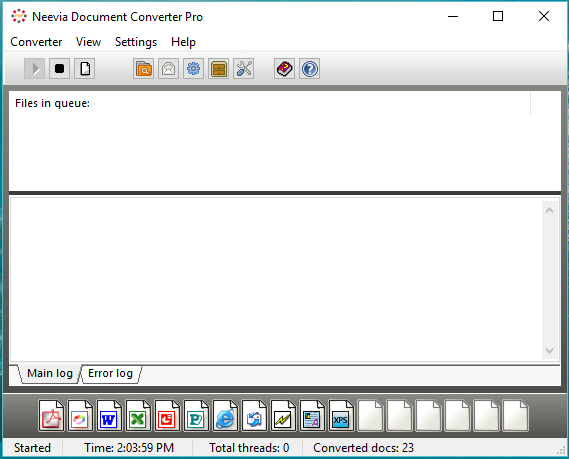
There are 4 menu items:
 Converter ® Start
- start Document Converter Pro;
Converter ® Start
- start Document Converter Pro;
® Stop - stop Document Converter Pro;
® Clear Logs - clear Document Converter Pro log window;
® Clear Converted Docs Count - reset converted files count to zero;
® Exit - close Document Converter Pro;
 View ®
Toolbar - display/hide main menu;
View ®
Toolbar - display/hide main menu;
® Parsers bar - display/hide parser bar;
 Settings ®
Folders … - add/edit/delete input folders;
Settings ®
Folders … - add/edit/delete input folders;
® eMail Watcher - edit eMail Watcher settings;
® Advanced … - edit Document Converter advanced settings;
 Help ®
User’s manual;
Help ®
User’s manual;
® About;
NOTE: Document Converter Pro 7.x supports folder specific configurations which means that you can set different conversion parameters for each input folder DC Pro watches. To modify parsers when this feature is enabled click Settings -> Folders -> double click on Folder to Scan -> Document Parsers tab -> select your parser. Folder specific configuration is enabled by default.
To disable it, in the main DC Pro interface click Settings -> Advanced and uncheck Folder-specific configuration.
Input/Output Folders
An input folder is a folder watched by the converter. When a file is copied into it, Document Converter picks it up, converts it to the specified output format then moves it to the output folder.
To define additional input/output folders in the main Document Converter screen menu select: Settings->Folders … The following screen will be displayed:
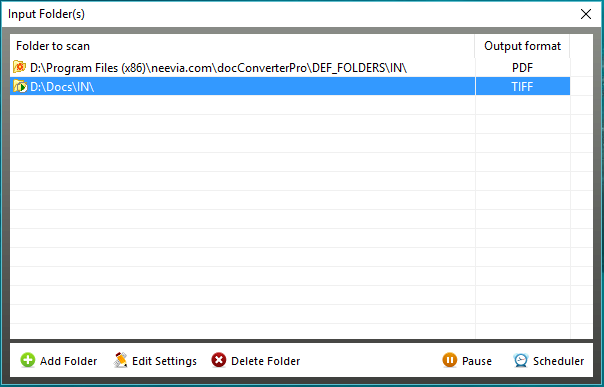
In the screen above you have a list of all input folders currently defined. On the bottom of the screen there are 5 buttons:
Add Folder - use this to add a new input folder to Document Converter;
Edit Settings - use this to edit the configuration of an existing input folder;
Delete Folder - use this to delete an input folder from Document Converter;
Pause/Resume Folder - pause/resume input folder processing;
Scheduler - use this for scheduling input folder processing;
When you select Add Folder or Edit Folder the following screen is displayed:
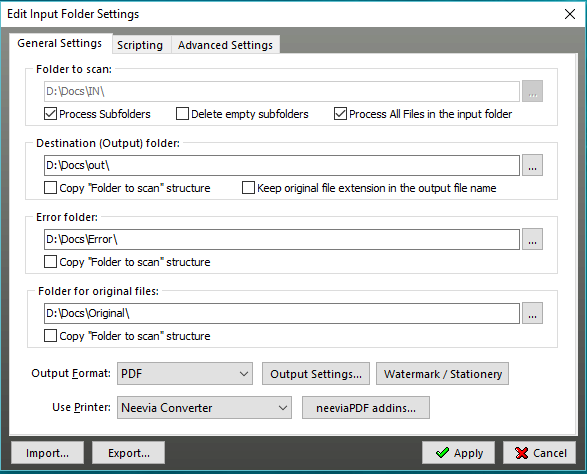
General Settings tab
Folder to scan - This is the path to the folder that Document Converter will scan for documents. You cannot change this folder once it has been entered. If you need to do that, you will need to add a new folder and delete the old one. Network paths (UNC names) are fully supported.
The Process Subfolders checkbox allows the user to have Document Converter process files in all the subfolders that may exist in Folder to scan. In case you do not want subfolders to remain in the input folder after processing check Delete empty subfolders.
If you’d like the converter to process all files in the input folder (unsupported formats will be automatically moved to the Error folder) you need to check Process all files in the input folder.
Destination folder – this is the folder where converted files should be placed.
Destination folder cannot be the same as Folder to scan. If the "Copy Folder to scan" checkbox is selected, Document Converter will recreate the Folder to scan subfolder structure in the Destination folder and will place the processed files in the corresponding subfolder. Should you like to keep the original file extension please check Keep original file extension in the output file name. The converted filename for, let’s say, an Excel document will be in this case filename.xls.pdf.
Error folder - the folder where documents that cannot be converted should be placed.
This folder cannot be the same name as Folder to scan. If you do not specify a path, the documents that cannot be converted will be deleted.
Folder for original files - the folder where original documents should be placed.
This cannot be the same name as Folder to scan. If you don’t specify a path, original documents will be deleted.
Output Format - use this to select the output format. It can be PostScript, PDF, PDF/A, JPEG, TIFF, TIFF fax optimized, PNG, PCX, PCL-XL, BMP, EPS, Printer or Send via Fax.
neeviaPDF addins - when clicked it allows you to enable the PDFcompress and/or PDFsign addins. These products must be installed on the same machine with Document Converter otherwise you will not be able to configure them. You can use them to compress and/or apply an electronic signature after the PDF conversion process is done.
Scripting tab
Scripting Language - select the language you want to use for your scriptlet - VBS/JS.
Script timeout - the timeout for script execution in milliseconds.
Script to execute - enter the full path to the VBScript or JScript scriptlet you want to have executed before/after conversion.
Allow script to interact with desktop - check this option to allow your script to interact with desktop (display MessageBoxes etc).
Note: Please read the section entitled Scripting for more information.
Advanced Settings tab
Here you can specify the file processing order. By default Document Converter will process files the way they are listed by the operating system. In case you want to change that please select by creation date or in alphabetical order. For multiple input folders you can specify the number of files that Document Converter should process from each input folder at a time. The default number is 5.
Watermark/Stationery
By using this feature you will be able to configure Document Converter Pro to place a stamp (watermark) on all converting files. To define new stamps press the Create Stamp button. The interface below will be displayed:
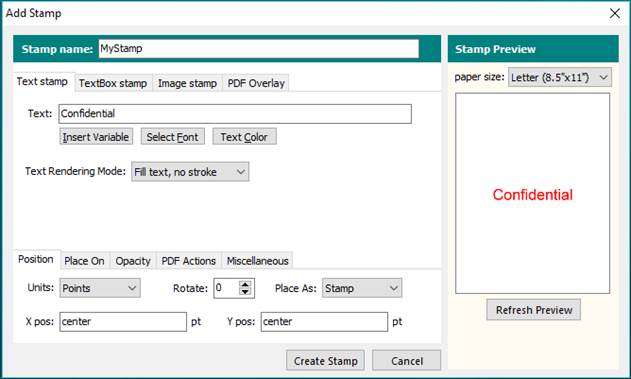
Stamp name - use this to set a name for the new stamp profile you want to create.
Stamp type:
Text stamp - only one line of text can be stamped;
TextBox stamp - multiple lines of text can be stamped;
Image stamp - allows you to specify an image that can be used as stamp;
PDF Overlay - allows you to specify an existing PDF file to be used as overlay.
Text stamp
To specify characteristics for Text stamp you have the following options that you can enable by clicking the buttons below:
a. Insert Variable - selects a variable from the list - see Appendix A for the entire list;
b. Select Font - defines both font name and size. In this window you also have the option to embed the font with or without subset;
c. Text Color - defines both text color and color space (Gray, RGB, CMYK);
d. Text Rendering Mode - click the down arrow to select:
- Fill text, no stroke
- Stroke text, no fill
- Fill then stroke text
- Invisible text
 |
 |
 |
Example:
Fill text, no stroke Stroke text, no fill Fill then stroke text
TextBox stamp
To specify characteristics for TextBox stamp you have the following options that you can enable by clicking the buttons below:
a. Insert Variable - to select a variable from the list - see Appendix A for the entire list;
b. Select Font - to define both font name and size. In this window you also have the option to embed the font with or without subset.
c. Text Color - to define both text color and color space (Gray, RGB, CMYK).
d. Text Alignment - ( left, center or right ). Check Word Wrap to automatically adjust lines of text to fit within the defined margins
e. TextBox Width, Height - enter values in points, inches, centimeters or milimeters. You can also use text for both as a value which creates a rectangle that contains the exact data you want to stamp.
f. Text Rendering Mode - click the down arrow to select:
- Fill text, no stroke
- Stroke text, no fill
- Fill then stroke text
- Invisible text
|
|
|
Example:
Fill text, no stroke Stroke text, no fill Fill then stroke text
Allows you to specify an image that can be used as a stamp.
Click Browse to select the image you would like as stamp.
Supported image types are: JPEG, GIF, BMP, PNG and TIFF.
Image Width - enter value in pixels.
Image Height - enter value in pixels.
Image Scale - allows you to scale the image stamp. A scale of 50% makes the image stamp half of the original image size, while a scale of 200% makes the image stamp double in size.
You can use this option to specify an existing PDF file to be used as overlay (stationery).
Click Browse to select the PDF file you would like to use as overlay. If multiple pages exist you can specify which page to be imported.
Scale - allows you to scale the PDF overlay. A scale of 50% makes the PDF overlay half of the original PDF size, while a scale of 200% makes it double in size.
After you finished with the above settings you can select:
Position - defines the measurement Units (Points, Inches, Centimeters or Millimeters), Rotation angle, Stamp placement (as stamp: over the page content or watermark: under the page content) and the X, Y coordinates. For the X coordinate you can use as values, not only numbers but center, left and right - this will position the watermark in the center of the page, on the left or right side. For Y you have center, top and bottom which will place the watermark in the center of the page on top or in the bottom. To position your watermark on the right lower corner use X=right and Y=bottom.
Place On - specifies the pages to stamp. Check "All pages" to place the stamp on all pages in the PDF file or "Pages" to specify the page numbers.
Opacity - specifies how transparent the stamp should be. A value of 100 means that the stamp is completely
opaque, while a value of 0 means that the stamp is invisible.
PDF Actions - specifies how the stamp should behave: as hyperlink or as link to a page.
Miscellaneous - specifies the page CropBox to position the stamp and/or use the page rotation parameter. The latter specifies the number of degrees by which the page should be rotated clockwise when displayed or printed.
In order to see the stamp position, click the Refresh Preview button on the right-hand side. This is also valid when you edit an existing stamp which can be done by clicking Edit stamp in the Stamps window.
Once you finished defining a stamp you can save it into a file that contains all the settings you selected. To do that in the Stamps graphic interface click Save Stamps and select your destination folder. To load a previously saved file containing stamp settings in the same interface click Load Stamps.
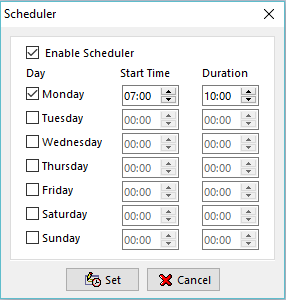
Scheduler
You can schedule Document Converter to process the selected input folder once a day for a specified duration of time. If the Scheduler is not enabled, Document Converter will process input folders continually. You must set the Start Time and Duration for each day enabled. Please note that a 24-Hour clock is used. You can enter the hour and minutes or use the up and down arrows to set the time.
PDF Output Format
If you select PDF as output format and press the Advanced Settings button the following screen will be displayed:
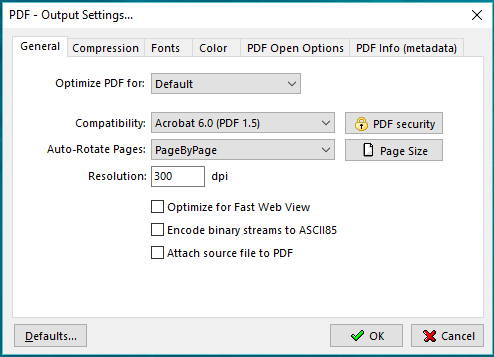
There are 6 tabs displayed:
General tab - use this to specify job options, document resolution, security options, optimization and other general settings;
Compression tab - choose appropriate compression options to reduce the size of PDF document;
Fonts tab - select the font embedding options;
Color tab - select the color profiles: RGB, GRAY, CMYK. If you want to preserve the color profile in the original file use Leave unchanged.
PDF Open options - select the PDF Open options;
PDF Info (metadata) - set the PDF metadata: Title, Author, Subject, Keywords;
General tab
Job Options:
For your convenience there are several sets of predefined settings for creating PDF files. These settings are designed to balance file size with quality, depending on how the PDF file is to be used:
• Default job option - is intended to be useful across a wide variety of uses, possibly at the expense of a larger output file. All color and grayscale images are downsampled at 72 dpi, monochrome images at 300 dpi; subsets of all fonts used in the file are embedded; and all information is compressed. PDF files created using the Default job option are compatible with Acrobat 4.0 (and later).
• Screen job option - intended for PDF files that will be displayed on the World Wide Web or an intranet, or that will be distributed through an e-mail system for on-screen viewing. This set of options uses compression, downsampling, and a relatively low resolution; converts all colors to RGB; maintains compatibility with Acrobat 3.0; to create a PDF file that is as small as possible. It also optimizes files for byte serving (fast web view).
• Printer job option – to be used for PDF files that are intended for desktop printers, digital copiers, publishing on a CD-ROM, or to send to a client as a publishing proof. In this set of options, file size is still important, but it is not the only objective. This set of options uses compression and downsampling to keep the file size down, but it also embeds subsets of all fonts used in the file, tags everything for color management, and prints to a medium resolution to create a reasonably accurate rendition of the original document.
• Prepress job option - intended for PDF files that will be printed as a high-quality final output to an imagesetter or, for example, a platesetter. In this case, file size is not a consideration. The objective is to maintain all the information in a PDF file that a commercial printer or service bureau will need to print the document correctly. This set of options downsamples color and grayscale images at 300 dpi, monochrome images at 1200 dpi, embeds subsets of all fonts used in the file, prints to a higher resolution, and uses other settings to preserve the maximum amount of information about the original document.
Compatibility
Select the PDF document compatibility level (a.k.a. PDF version).
Auto-Rotate Pages
Auto-Rotate Pages automatically rotates pages based on the orientation of the text. For example, some pages (such as those containing tables) in a document may require the document to be turned sideways so it can be read. Choose "None" to disable the Auto-Rotate Pages option. Choose "All" to rotate all pages in a document based on the orientation of the majority of text. Choose "PageByPage" to rotate each page based on the direction of text on that page.
Resolution
Here you can define the output document resolution. Usually, a higher resolution setting will result in a larger but higher quality PDF document, while a lower setting will result in a smaller but lower quality PDF document. You can enter a value from 72 to 2400.
NOTE: Low resolution is ideal for screen viewing. However, if high-quality paper print or the accurate control of character position is required, you should choose a resolution of at least 600dpi.
PDF Security
NOTE: All Neevia products enforce the restrictions set by PDF Security (encryption). However, not all third party products fully support these settings. Recipients using such third party products may be able to bypass some of the restrictions you have set.
If you press the PDF Security button the following screen will be displayed:
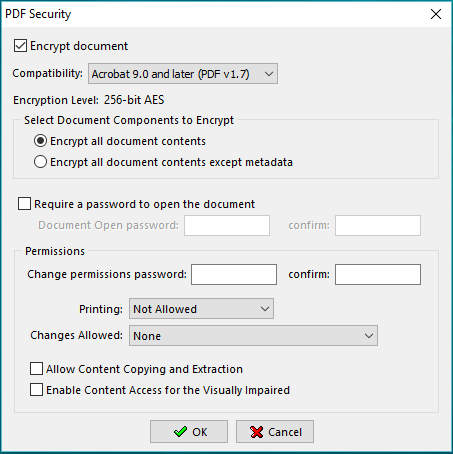
Selecting the Use Security checkbox will turn on the security options and apply them to the resulting PDF file.
Compatibility drop-down box. There are 5 options:
a. Acrobat 5.0 and later (PDF 1.4) enables 128 bit RC4 encryption;
b. Acrobat 6.0 and later (PDF 1.5) enables 128 bit RC4 encryption;
c. Acrobat 7.0 and later (PDF 1.6) enables 128 bit AES encryption;
d. Acrobat 9.0 and later (PDF 1.7) enables 256 bit AES encryption.
e. Acrobat X and later (PDF 1.7 ext 3) enables 256 bit AES R6 encryption
Encrypt All Document Contents
When you select this option both the document and document metadata will be encrypted. Search engines will not be able to access the document metadata when this option is used.
Encrypt All Document Contents except Metadata
Valid for Acrobat 6 and later. Only the content of a PDF document will be encrypted. Metadata remains fully accesible for search engines.
Require a Password to Open the Document
This allows you to set a password for opening the encrypted PDF.
Change Permissions Password
This password prevents users from changing the permission settings. The user can view the file in Acrobat Reader but must enter the specified Permissions password in order to change the file’s Security and Permissions settings.
Permissions:
Printing Allowed - Specifies the level of printing that users are allowed for the PDF document. Possible values:
None - disables printing.
Low Resolution (150 dpi) - Users can print but the resolution will not be higher than 150-dpi. Each page is printed as a bitmap image which may cause files to print at a slower speed. To make this option available set the Compatibility option to Acrobat 5 (PDF 1.4) or later.
High Resolution - Allow users to print at any resolution. PostScript and other printers that come with high-quality printing features can be used.
Changes Allowed - Enables the editing actions that are allowed in the PDF document. Possible values:
None - when selected none of the changes listed in Changes Allowed drop down box, such as filling in form fields and adding comments are permitted.
Inserting, Deleting, And Rotating Pages - allows users to insert, delete, and rotate pages. Also bookmarks and thumbnails creation are permitted. This option works only for high (128‑bit RC4, AES or AES256) encryption.
Filling in Form Fields and Signing Existing Signature Fields - when selected users can fill in forms and add digital signatures. Adding comments or creating form fields is not permitted. This option works only for high (128‑bit RC4, AES or AES256) encryption.
Commenting, Filling In Form Fields and Signing Existing Signature Fields - users are allowed to add comments, digital signatures and fill in forms. Moving page objects or create form fields is not permitted.
Page Layout, Filling in Form Fields and Signing - users can insert, rotate or delete pages and create bookmarks or thumbnail images, fill out forms, and add digital signatures. Creating form fields is not permitted. This option works only for low (40‑bit RC4) encryption.
Any Except Extracting Pages - allows users to edit the document, create and fill in form fields, add comments and digital signatures.
Enable Copying of Text, Images, and Other Content - allows users to select and copy the contents of a PDF.
Enable Text Access For Screen Reader Devices For The Visually Impaired - when selected visually impaired users can read the document with screen readers. It doesn’t allow users to copy or extract the document’s contents. This option works only for high (128-bit RC4, AES or AES256) encryption.
NOTE: there are programs available to crack the password. The longer the password, the harder it is to crack. Please consider this when selecting a password.
Page Size
This allows you to select the page size and orientation for the converting documents. In case you would like to define your own pagesize check Custom Page Size and enter your values for height and width specifying also the measurement units. Check Scale to scale the page content. Make sure that Constrain proportions when scaling is checked in case you would like to maintain the original proportions between the new page dimensions and content.
NOTE: you should keep Page Size on Default if you want to preserve the original document page size during the PDF conversion process.
Compression Tab
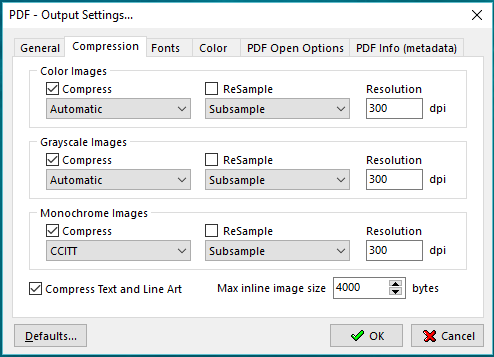
Document Converter Pro allows the compression of images (bitmaps), text, and graphics (line art).
ReSampling also provides a further reduction of very large or high-resolution images.
Since the effectiveness of compression is highly data dependent, for the best result, you might want to try different compression settings for different kinds of data sources.
For color or grayscale images, choose ZIP to apply the compression that works well on images with large areas of single colors or repeating patterns, such as screen shots, simple images created with paint programs, and black-and-white images that contain repeating patterns. Choose JPEG, quality minimum to maximum, to apply the compression that is suitable for grayscale or color images, such as continuous-tone photographs that contain more detail than can be reproduced on-screen or in print. Choose Automatic to determine automatically the best quality for color and grayscale images.
NOTE: For monochrome images, choose CCITT or ZIP compression. Make sure that monochrome images are scanned as monochrome and not as grayscale. Scanned text is sometimes saved as grayscale images by default. Grayscale text compressed with the JPEG compression method is “muddy” at best and may be unreadable.
Resample
To resample color, grayscale, or monochrome images, Document Converter Pro combines pixels in a sample area to make one larger pixel. You provide the resolution of your output device in dots per inch (dpi) and select the resample algorithm:
Average Downsample – this algorithm averages the pixels in a sample area and replaces the entire area with the average pixel color at the specified resolution.
Subsample – this algorithm chooses a pixel in the center of the sample area and replaces the entire area with that pixel at the specified resolution. Subsample significantly reduces the conversion time compared with downsampling but results in images that are less smooth and continuous.
Bicubic Downsample – this algorithm uses a weighted average to determine pixel color and usually yields better results than the simple averaging method of downsampling. Bicubic is the slowest but most precise method, resulting in the smoothest tonal gradations.
NOTE: Resampling monochrome images can have unexpected viewing results, such as no image display. If this happens, turn off resampling and convert the file again. This problem is most likely to occur with subsample and least likely with bicubic downsample.
Fonts Tab
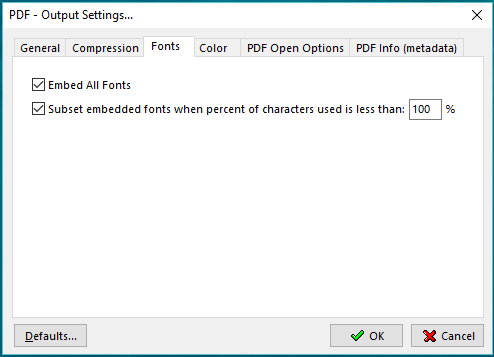
Under the Fonts tab you can enable or disable embedding fonts in the resulting PDF file.
Select Subset embedded font option to include only those characters of a font that are used in the PDF document, to reduce document size. A "threshold" is specified to tell if font-subset is necessary. If the percentage of used characters (compare with total characters of the particular font) exceeds this threshold, the entire font is embedded.
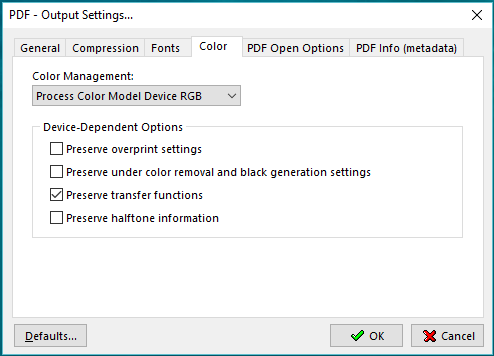
Process Color Model Device RGB
Sets the color space to use for device-dependent colors in the output document to DeviceRGB.
NOTE: this does not affect images and shadings.
Process Color Model Device CMYK
Sets the color space to use for device-dependent colors in the output document to DeviceCMYK.
NOTE: this does not affect images and shadings.
Process Color Model Device Gray
Sets the color space to use for device-dependent colors in the output document to DeviceGray.
NOTE: this does not affect images and shadings.
Leave Unchanged
Enabling this option will force Document Converter to preserve the color model in the original document.
Device-dependent Options
Choose any of these options only if you are working with documents created by high-end documentation and graphics applications, such as Adobe Illustrator and Adobe InDesign. For more information, see the documentation that came with the application.
"Preserve overprint settings" retains any overprint settings in files being converted to PDF. Overprinted colors are two or more inks printed on top of each other. For example, when a cyan ink prints over a yellow ink, the resulting overprint is a green color. Without overprinting, the underlying yellow would not be printed, resulting in a cyan color.
Transfer functions are used for artistic effect and to correct for the characteristics of a specific output device. For example, a file that is intended for output on a particular imagesetter may contain transfer functions that compensate for the dot gain inherent with that printer.
"Preserve under color removal and black generation" retains these settings if they exist in the PostScript file. Black generation calculates the amount of black to be used when trying to reproduce a particular color. Undercolor removal (UCR) reduces the amount of cyan, magenta, and yellow components to compensate for the amount of black that was added by the black generation. Because it uses less ink, UCR is generally used for newsprint and uncoated stock.
"Preserve Transfer Functions" retains the transfer functions traditionally used to compensate for dot gain or dot loss that may occur when an image is transferred to film. Dot gain occurs when the ink dots that make up a printed image are larger (for example, due to spreading on paper) than in the halftone screen; dot loss occurs when the dots print smaller. With this option, the transfer functions are kept as part of the file, and are applied to the file when the file is output.
"Preserve halftone information" retains any halftone information in files. Halftone information consists of dots that control how much ink is deposited by halftone devices at a specific location on the paper. Varying the dot size and density creates the illusion of variations of gray or continuous color. For a CMYK image, four halftone screens are used: one for each ink used in the printing process. In traditional print production, a halftone is produced by placing a halftone screen between a piece of film and the image and then exposing the film. Electronic equivalents, such as in Adobe Photoshop, let users specify the halftone screen attributes before producing the film or paper output. Halftone information is intended for use with a particular output device.
PDF Open Options tab
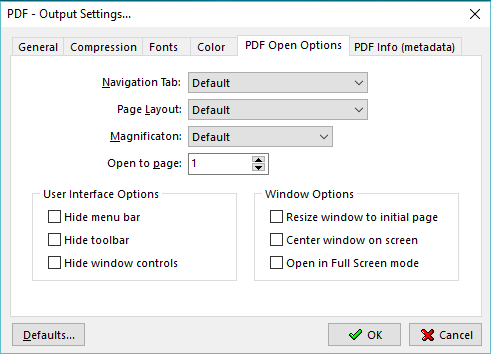
The PDF Open options tab controls how PDF files appear when opened.
Navigation Tab - specifies which panels are displayed in the PDF viewer navigation pane.
Page Layout - specifies how document pages are arranged.
Magnification - use this to select at what zoom level PDF documents will appear when opened.
Open To Page - specifies the page that appears when the PDF document opens.
User Interface Options
This allows you to specify which parts of the PDF viewer interface - menu bar, toolbars, window controls – can be hidden.
Window Options
Use these options to specify how the PDF viewer window adjusts in the screen area when a PDF document is opened:
Resize Window To Initial Page - adjusts the document window to fit snugly around the opening page, taking into account the options that you selected under Document Options.
Center Window On Screen - instructs the PDF viewer to position the window in the center of the screen area.
Open In Full Screen Mode - maximizes the document window and displays the document without the menu
bar, toolbar, or window controls.
NOTE: take into account that if you hide the menu bar and toolbars users cannot apply commands and select tools unless they know the keyboard shortcuts.
PDF Info (metadata) tab
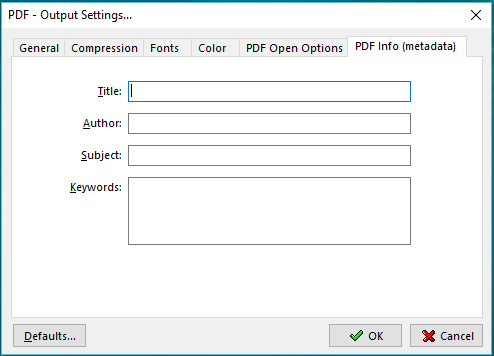
In this interface you can specify Title, Author, Subject and Keywords for the resulting PDF document.
PDF/A Output Format
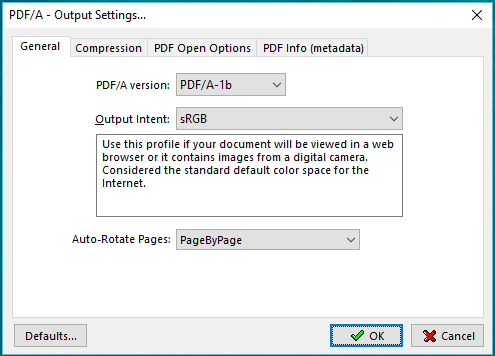
PDF/A was initially defined as a subset of PDF 1.4 and is mainly used for long-term archiving purposes.
Document Converter Pro can create PDF/A-1b, PDF/A-2b, PDF/A-3b, PDF/A-2u and PDF/A-3u documents. These formats ensure a reliable reproduction of the visual appearance of the original file.
PDF/A-1b standard requires that resulting files must include embedded fonts, device-independent color and XMP metadata. This means that encryption, LZW compression, embedded files, external content references, transparency, multimedia and JavaScript are prohibited.
PDF/A-2b was defined as a constrained form of PDF version 1.7. As far as compression goes, JPEG2000 is now fully supported.
PDF/A-3b is mostly about visual integrity meaning that the output PDF displays consistently.
PDF/A-2u is the same level of conformance as 2b but has an additional requirement: all text must have Unicode mapping.
PDF/A-3u makes sure that the Unicode text is searchable and can be copied.
JPEG Output Format
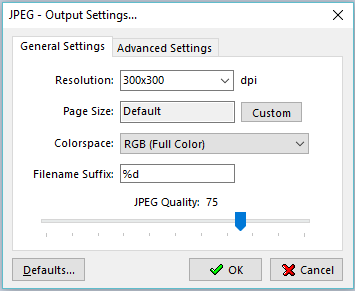
If you select JPEG as output format and press the "Advanced…" button the following screen will be displayed:
General Settings Tab
Resolution - sets the JPEG resolution.
Colorspace - allows you to select color space in the output document: RGB, CMYK and Grayscale.
Filename suffix
Since the jpeg format doesn’t support multi-page files, when converting documents that have more than 1 page, Document Converter will produce a jpeg file for each page of the original document. The filename suffix allows you to control how the single page files will be named - if you set %d the converter will add the page number to the file name. You can also control the number of digits used in the file name by replacing %d with %0Nd where N is the number of digits you want to have, for example %03d will force Document Converter to produce files with names like this: 'filename001.jpg', ... , 'filename010.jpg', ... %04d will produce: 'filename0001.jpg', ... , 'filename0010.jpg', ...
JPEG Quality - sets the output quality level according to the widely used IJG quality scale, which balances the extent of compression against the fidelity of the image when reconstituted. Lower values drop more information from the image to achieve higher compression, and therefore have lower quality when reconstituted.
Advanced Settings Tab
Text antialiasing/Graphics antialiasing
These options control the use of subsample antialiasing. Their use is highly recommended for producing high quality rasterizations. The subsampling box size should be 4 bits for optimum output, but smaller values can be used for faster rendering. Antialiasing is enabled separately for text and graphics content. Allowed values are None, 1 bit, 2 bits or 4 bits.
Note that because of the way antialiasing blends the edges of shapes into the background when they are drawn some files that rely on joining separate filled polygons together to cover an area may not render as expected with Graphics antialiasing at 2 or 4 bits. If you encounter strange lines within solid areas, try rendering that file again with Graphic antialiasing at 1 bit.
Image interpolation
Select “On” to enable image interpolation for all images, improving image quality for scaled images at the expense of speed.
Well Tempered Screening
If “On”, then the Well Tempered Screening algorithm is used for halftoning. Otherwise, a rational tangent algorithm is chosen, which will typically result in significant differences between the screen angle and the ruling requested, and actually rendered. Currently, the performance of WTS is reasonably good when rendering to a full page buffer, but not optimized for banded mode.
Use CIE color space
Select “On” to remap the device-dependent color values through a CIE color space. This can improve the conversion of CMYK documents to RGB.
TIFF Output Format
TIFF General Settings Tab
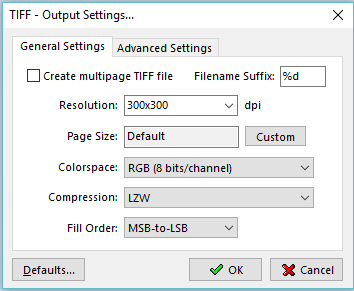
Create multipage TIFF - when selected the resulting tiff will contain as many pages as the original input file.
Filename suffix
If the "Create multipage file" checkbox is not checked, when converting documents that have more than 1 page, Document Converter will produce a tiff file for each page in the original document. The filename suffix allows you to control how the single page files will be named - if you set %d Document Converter will add the page number to the file name. You can also control the number of digits used in the file name by replacing %d with %0Nd where N is the number of digits you want to have, for example %03d will force Document Converter to produce files with names like this: 'filename001.tif', ... , 'filename010.tif', ... %04d will produce: 'filename0001.tif', ... , 'filename0010.tif', ...
Resolution - sets the TIFF resolution.
Colorspace - selects the number of colors in the output document.
Compression - sets the tiff compression algorithm. Note that G3 with EOLs, G3 with no EOLs, G3 2D fax compression and G4 fax compression can only be set for Grayscale documents.
Advanced Settings Tab
Text antialiasing/Graphics antialiasing
These options control the use of subsample antialiasing. Their use is highly recommended for producing high quality rasterizations. The subsampling box size should be 4 bits for optimum output, but smaller values can be used for faster rendering. Antialiasing is enabled separately for text and graphics content. Allowed values are None, 1 bit, 2 bits or 4 bits.
Note that because of the way antialiasing blends the edges of shapes into the background when they are drawn some files that rely on joining separate filled polygons together to cover an area may not render as expected with Graphics antialiasing at 2 or 4 bits. If you encounter strange lines within solid areas, try rendering that file again with Graphic antialiasing at 1 bit.
Image interpolation
Select On to enable image interpolation for all images, improving image quality for scaled images at the expense of speed.
Well Tempered Screening
If On, the Well Tempered Screening algorithm is used for halftoning. Otherwise, a rational tangent algorithm is chosen, which will typically result in significant differences between the screen angle and ruling requested, and actually rendered. Currently, the performance of WTS is reasonably good when rendering to a full page buffer, but not optimized for banded mode.
Use CIE color space
Select On to remap the device-dependent color values through a CIE color space. This can improve the conversion of CMYK documents to RGB.
TIFF Fax Optimized Output Format
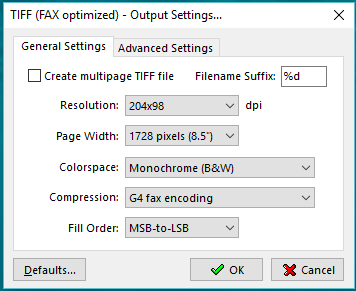
In this interface you have two predefined configurations for creating tiff files specifically for faxing purposes. The one enabled by default is Standard resolution fax. To switch to Fine resolution fax instead of 204x98, for resolution select 204x196 dpi.
PNG/BMP/PCX/PSD Output Formats
General Settings Tab
Resolution - sets the image resolution.
Colorspace - allows you to select the color space/number of colors in the output document.
Filename suffix
Since these image formats do not support multi-page files, when converting documents that have more than 1 page, Document Converter will produce a file for each page of the original document. The filename suffix allows you to control how the single page files will be named - if you set %d Document Converter will add the page number to the file name. You can also control the number of digits used in the file name by replacing %d with %0Nd where N is the number of digits you want to have, for example %03d will force the converter to produce files with names like this: 'filename001.pcx', ... , 'filename010.pcx', ... %04d will produce: 'filename0001.pcx', ... , 'filename0010.pcx', ...
Advanced Settings Tab
Text antialiasing/Graphics antialiasing
These options control the use of subsample antialiasing. Their use is highly recommended for producing high quality rasterizations. The subsampling box size should be 4 bits for optimum output, but smaller values can be used for faster rendering. Antialiasing is enabled separately for text and graphics content. Allowed values are None, 1 bit, 2 bits or 4 bits.
Note that because of the way antialiasing blends the edges of shapes into the background when they are drawn some files that rely on joining separate filled polygons together to cover an area may not render as expected with Graphics antialiasing at 2 or 4 bits. If you encounter strange lines within solid areas, try rendering that file again with Graphic antialiasing at 1 bit.
Image interpolation
Select On to enable image interpolation for all images, improving image quality for scaled images at the expense of speed.
Well Tempered Screening
If On, then the Well Tempered Screening algorithm is used for halftoning. Otherwise, a rational tangent algorithm is chosen, which will typically result in significant differences between the screen angle and ruling requested, and actually rendered. Currently, the performance of WTS is reasonably good when rendering to a full page buffer, but not optimized for banded mode.
Use CIE color space
Select On to remap the device-dependent color values through a CIE color space. This can improve the conversion of CMYK documents to RGB.
PRINTER Output Format
When the above format is selected all files in the input folder will automatically be sent to the printer that is associated with this Input folder. To associate Document Converter with a printer that you want to to print your files to, in the Use Printer drop-down box click on the down arrow and make your choice from the available printers. If your printer supports multi-threading click Output Settings and check Enable multi-threaded printing. In the interface below click Configure Printer Settings to select the desired printer configuration.
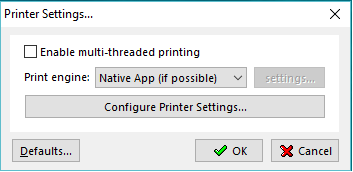
As a print engine you can use either the Native App (for example when you need to print MsWord documents you can have the converter use MsWord directly to print your files) or Neevia bitmap.
The latter can be used mostly if you need to print all your files using a specific paper size – you have a printer that only supports Letter.
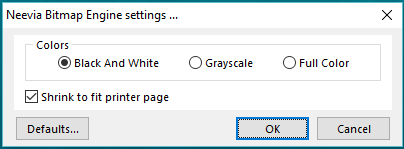
In the above interface select the Colors option according to your printer capabilities. Check Shrink to fit printer page to have Document Converter scale the content in such a way so it fits properly when printed.
SEND VIA FAX as Output Format
Instead of converting files that are in the Input folder when this output format is selected Document Converter will fax your documents to the fax number provided in the Fax Settings interface. In order for Document Converter to function properly when this output format is selected you must install and start the Windows Fax service. Please follow the required steps for installing this service according to your operating system.
Document Parsers
A Document Parser can be defined as the program that is used to convert the document from an input to an output format. To add/edit/delete a custom document parser in the Document Converter main menu select Settings-> Folders -> Folder to scan -> Edit Settings -> Document Parsers …
The following screen will be displayed:
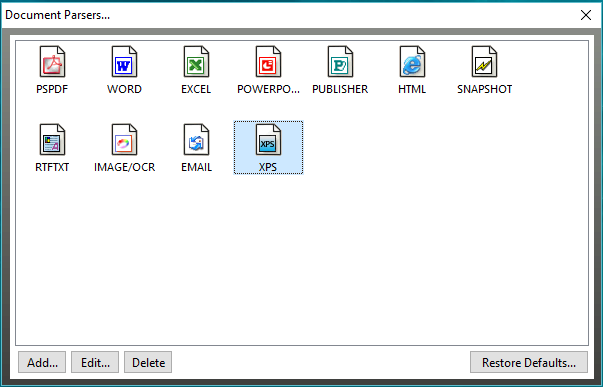
In the above screen you will see the document parsers that are currently defined. On the bottom of the screen there are four choices:
Add… - use this to add a new document parser;
Edit… - use this to change the characteristics of the selected document parser;
Delete - use this to delete a document parser.
Restore Defaults… - this will restore the default configuration. You can also use Restore Defaults in case a newly installed application that was detected as a parser is not listed in the Document Parsers interface or you deleted an existing parser by mistake.
If you select Add or Edit parser the following screen is displayed:
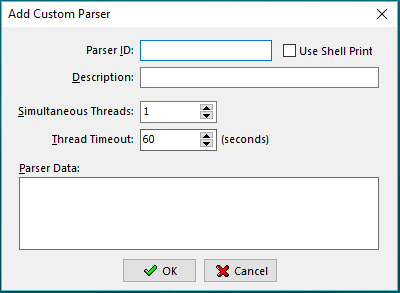
Parser ID - A unique identifier for the document parser. Cannot be changed once entered (don’t use built-in IDs: PSPDF, WORD, EXCEL, POWERPOINT, IMAGE/OCR, HTML).
Use Shell Print - Specifies if the new parser will use the windows shell print capability.
Description - Document parser description – for example Parser for extension xyz.
Simultaneous Threads - The number of simultaneous conversions this parser will support. Please note that not all applications support concurrent thread execution or that performance with multiple threads is poor.
Thread Timeout - Document parser thread timeout. Enter -1 to disable the timeout option.
Parser Data - The command line for the document parser. You can use the following variables: #inFolder# - for document input folder, #outFolder# - for output folder, #fullFileName# - for the full file name (including file extension) of the input document, #fileName# - for the file name (without file extension) of the input document, #outFormat# - for output document format (ex. ps, PDF, jpg, tif, bmp, png, pcx).
Ex: if you have an application gif2jpeg.exe that converts jpeg files to bmp format and would like to create a new document parser based on this application then the "Parser Data:" field should look like this:
c:\converters\gif2jpeg.exe #inFolder##fullFileName# #outFolder##fileName#.jpg
WORD Document Parser
If in the Document parsers window you select "WORD" as a parser and press the "Edit… parser" button, the following screen will be displayed:
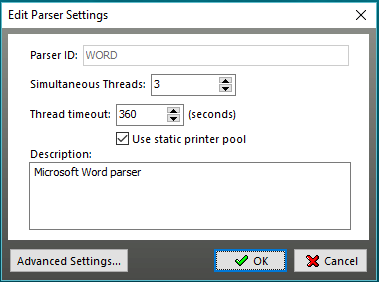
"WORD" parser supports multiple threads, so to increase performance make sure you set the number of simultaneous threads to at least 2.
When you press the "Advanced" button the following interface is displayed:
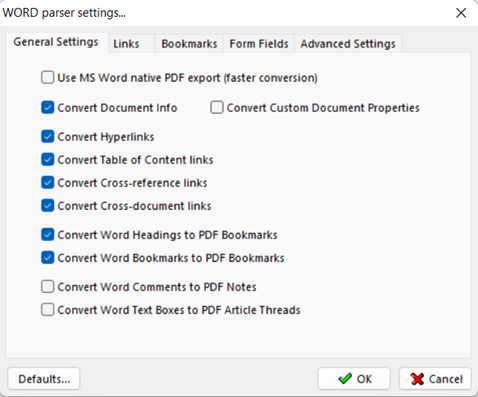
General Settings tab
In this interface you can control what MS Word elements are converted to PDF. The nine options are as follows:
Create Hyperlinks: converts Internet hyperlinks to PDF web links
Create Cross-reference links: creates links between cross-references,
Create Table of Content links: table of content entries are linked with their destinations
Create Cross-document links: converts hyperlinks that point to other documents into PDF links
Convert Comments to Notes: converts Word comments to PDF text notes
Convert Word text boxes to PDF Article Threads: converts Word Text boxes to PDF article threads
Convert Document Info: converts Word document properties (for example, author or creation date) to PDF document information
Convert Word Headings to PDF Bookmarks: converts Word headings to PDF bookmarks
Convert Word Bookmarks to PDF Bookmarks: converts Word native bookmarks to PDF bookmarks
Use MS Word native PDF export (faster conversion): instructs Document Converter to use the native MS Word export engine. In order to use this feature MS Word 2007 or higher must be installed on the same machine with Document Converter Pro
Links tab
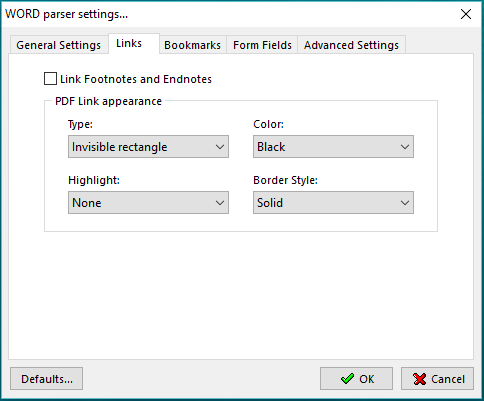
Check the "Link footnotes & endnotes" checkbox to enable footnotes/endnotes processing.
PDF Link Appearance group controls the appearance of links when the PDF file is viewed:
Type list box: allows you to select whether the links will be invisible, visible with thin lines, or visible with thick lines.
Highlight list box: allows you to select how links are highlighted when they are clicked. The four choices are None, Invert, Outline, and Inset.
Color list box: sets the color of links.
Style list box: selects between solid and dashed lines for visible links.
Bookmarks tab
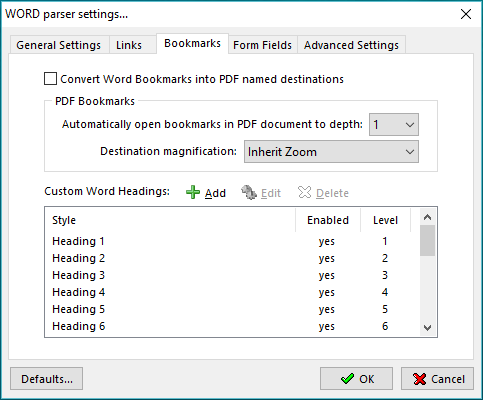
Convert Bookmarks into PDF named destination: converts word bookmarks into PDF named destinations.
Automatically open bookmarks in the PDF document to depth: collapses or expands the document headings when the PDF is opened.
Destination magnification: controls the open magnification of the bookmark destination.
Custom Word Headings
In the Bookmark column, deselect bookmarks for headings (or other items) that you don't want to be converted. You can change the bookmark level associated with a heading (or other item) only if that heading (or item) is selected. If a file contains paragraphs formatted using discontinuous heading levels, Document Converter inserts blank bookmarks for each of the missing levels.
Form Fields tab
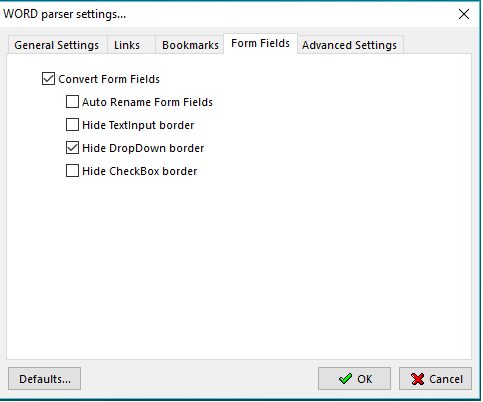
Convert Form Fields: enables word form fields conversion into PDF form fields.
Auto Rename Form Fields: automatically renames form fields that have the same name so all the fields in the PDF document will have unique names.
Hide TextInput Border: disables the text field border in the PDF file.
Hide DropDown Border: disables the combobox/listbox field border in the PDF file.
Hide CheckBox Border: disables the checkbox field border in the PDF file.
Advanced Settings tab
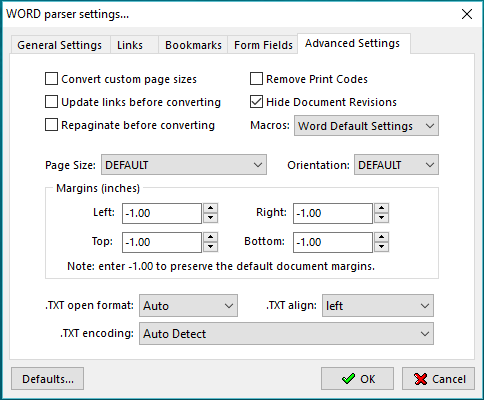
Convert Custom Page Sizes: instructs the MS Word parser to convert documents with page sizes that
are not defined in the Windows printing system.
Update Links Before Converting: updates all links in the original file before conversion.
Repaginate Before Converting: recalculates page breaks before the conversion process begins.
Remove Print Codes: removes all hidden print/fields commands in the original word document.
Hide Document Revisions: hides all document revisions before conversion.
Macros: specifies MS Word macros policy. Available settings: Word Default Settings, Disable Auto
Macros, Disable All, Enable All.
Pages Size: allows you to select a specific page size for the converting file.
Orientation: Default, Portrait, Landscape.
Margins: in this section you can specify your values for Top, Left, Bottom and Right margins. When -1
is used the original margin values in the converting document will be preserved.
.TXT Open format: specifies what format the MS Word parser will use when converting text
documents.
.TXT align: specifies how to align text in the converting document.
.TXT Encoding: instructs the parser which encoding to use when converting text files.
EXCEL Document Parser
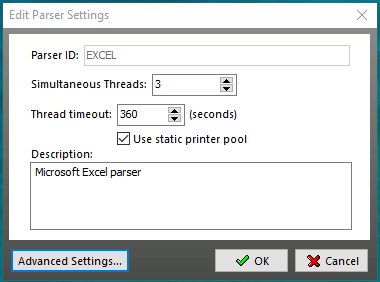
This parser supports multiple threads so to increase performance make sure you set the number of simultaneous threads to at least 2.
When you press Advanced Settings in the Excel parser window the following screen will be displayed:
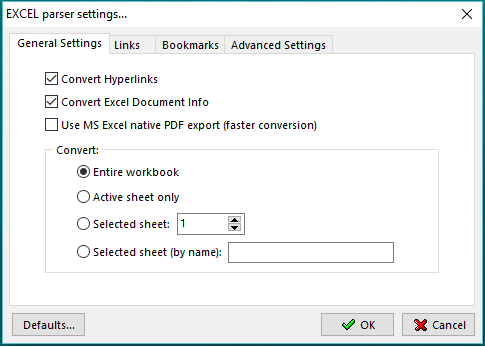
Convert Hyperlinks: enables the Excel parser to convert Internet hyperlinks into PDF web links.
Convert Excel Document Info: preserves the original document info when converting to PDF.
Use MS Excel native PDF export (faster conversion): instructs Document Converter to use the native MS Excel export engine. In order to use this feature MS Excel 2007 or higher must be installed on the same machine with Document Converter Pro.
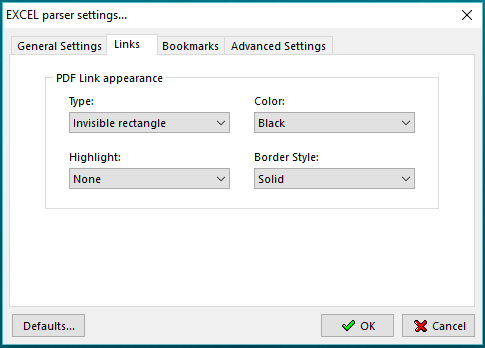
PDF Link Appearance group: controls the appearance of links when PDF files are viewed.
Type list box: allows you to select whether the links will be invisible, visible with thin lines, or visible with thick lines.
Highlight list box: allows you to select how links are highlighted when they are clicked. The four choices are None, Invert, Outline, and Inset.
Color list box: sets the color of links.
Style list box: selects between solid and dashed lines for visible links.
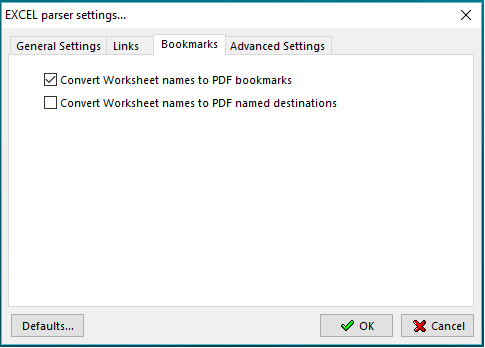
Convert Worksheet names to PDF bookmarks: this converts each worksheet name into a PDF bookmark.
Convert Worksheet names to PDF named destinations: converts worksheet names into PDF named destinations.
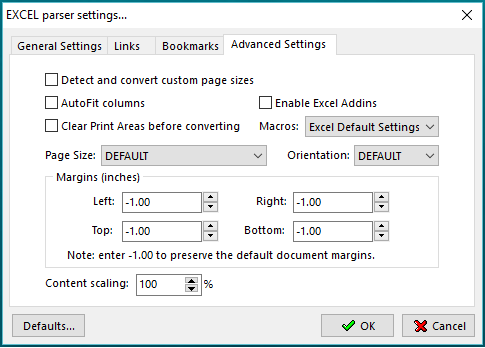
Detect and convert custom page sizes: enables the MS Excel parser to convert documents with page sizes
that are not defined in the Windows printing system.
Disable Excel Auto Macros: prevents MS Excel from executing macros during the file opening phase.
Clear Print Areas before converting: this option clears the print area of every worksheet in a workbook.
Enable Excel Add-ins: when enabled all Add-ins installed in Excel will be allowed to run.
Auto-Resize document: when enabled will automatically resize all rows and columns in the converting
Excel file.
Pages Size: allows you to select a specific page size for the converting file.
Orientation: use this to select page orientation - Default, Portrait, Landscape.
Margins: in this section you can specify your values for Top, Left, Bottom and Right margins. When -1 is
used the original margin values in the converting document will be preserved.
Content Scaling: scales the page content to the value in textbox. Default value: 100%.
POWERPOINT Document Parser
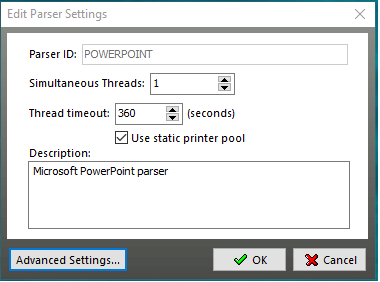
When you click Advanced Settings in the PowerPoint parser window the following screen will be displayed:
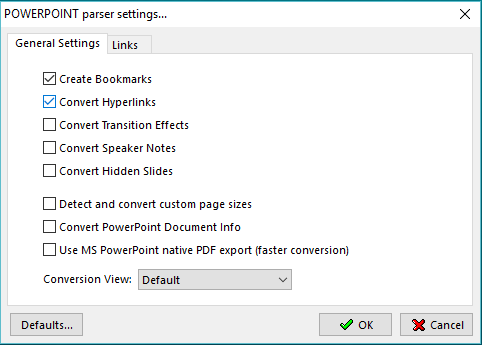
Create bookmarks: converts headings into PDF bookmarks.
Convert Hyperlinks: enables the PowerPoint parser to convert Internet hyperlinks into PDF web links.
Convert Transition Effects: preserves the transition effects when converting to PDF.
Convert Speaker Notes: preserves speaker notes added to presentation slides when converting to PDF.
Convert Hidden Slides: will convert all hidden slides in the original document.
Detect and convert custom page sizes: enables the PowerPoint parser to convert documents with page sizes that are not defined in the Windows printing system
Convert PowerPoint Document Info: preserves the original document info when converting to PDF.
Use MS PowerPoint native PDF export (faster conversion): instructs Document Converter to use the native MS PowerPoint export engine. In order to use this feature MS PowerPoint 2007 or higher must be installed on the same machine with Document Converter Pro.
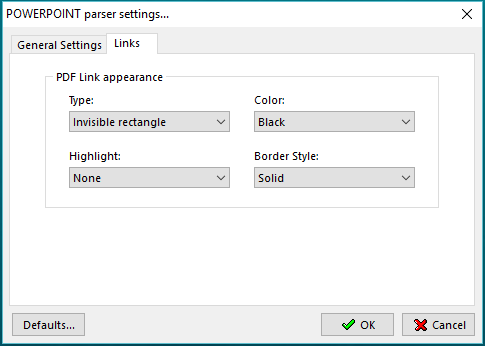
PDF Link Appearance group: controls the appearance of links when PDF files are viewed.
Type list box: allows you to select whether the links will be invisible, visible with thin lines, or visible with thick lines.
Highlight list box: allows you to select how links are highlighted when they are clicked. The four choices are None, Invert, Outline, and Inset.
Color list box: sets the color of links.
Style list box: selects between solid and dashed lines for visible links.
HTML Document Parser
Header-Footer tab
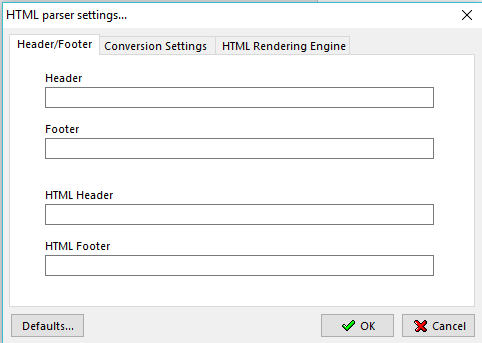
In the interface above you can define your own header/footer by typing the text in the corresponding textbox. If you’d like to use use predefined codes you can do it as illustrated below.
&w - will include the Window title.
&u - page address (URL).
&d - date in short format specified by Regional Settings.
&D - date in long format specified by Regional Settings.
&t - time in the format specified by Regional Settings.
&T - time in 24-hour format.
&p - current page number.
&P - total number of pages.
&& - a single ampersand: &.
&b - separates preceding and following text into different sections.
Text && &p - custom text (can be used in combination with printing codes).
Conversion Settings tab
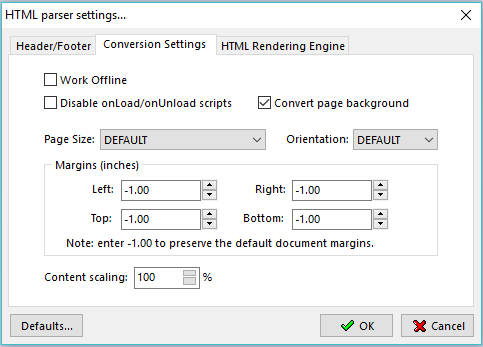
Work offline: toggles the HTML parser between online and offline modes of operation.
Disable onLoad/onUnLoad scripts: prevents the HTML parser from executing scripts related to onLoad (fires when the object has been completely received from the server) and onUnload (fires immediately before the object is unloaded) events.
Convert page background: preserves the page background in the original html document.
Pages Size: allows you to select a specific page size for the converting file.
Orientation: Default, Portrait, Landscape.
Margins: in this section you can specify your values for Top, Left, Bottom and Right margins. When -1 is used the original margin values in the converting document will be preserved.
Content Scaling: scales the page content to the value in textbox. Default value: 100%.
NOTE: if you use Internet Explorer 10.x/11.x as a parser and convert large volumes of htm/html files you may want to consider disabling "Restore last session" option:
1. Run Registry Editor by typing RegEdit.exe in the Start -> Run interface.
2. Navigate to the following registry key branch: HKEY_CURRENT_USER\Software\Policies\Microsoft\Internet Explorer\Recovery. If the registry key (i.e. Internet Explorer and/or Recovery) does not exist, create one manually by right clicking on parent branch, and choose New -> Key, and then name the key according. In the right pane, create a new DWORD value by right clicking on blank space and choose New -> DWORD (32-bit) Value, and then name it as NoReopenLastSession. Double-click on NoReopenLastSession and set its value data to 1.
3. Exit Registry Editor and restart IE for the change to take effect.
HTML Rendering Engine tab
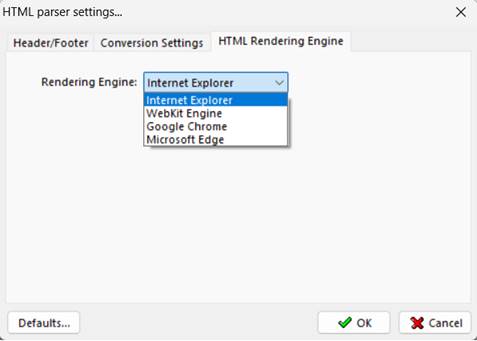
Aside from Internet Explorer, you can also use third party HTML parsers.
There are three options available:
1. WebKit, which you can download from here: https://wkhtmltopdf.org/downloads.html
After installing, restart the converter and in the above tab select WebKit. The conversion speed will increase because unlike IE, Webkit no longer uses the print spooler to render the input file.
2. Google Chrome: to use this parser first you need make sure that Chrome (i.e. the web browser) is installed on the same machine with Document Converter Pro. Once done, restart the converter and you will be able to select it as a parser for HTML documents. It will be faster than IE because the conversion is done in one step HTML -> PDF without involving the print spooler.
3. Microsoft Edge: to use this parser first you need make sure that MS Edge (i.e. the web browser) is installed on the same machine with Document Converter Pro. Once done, restart the converter and you will be able to select it as a parser for HTML documents. It will be faster than IE because the conversion is done in one step HTML -> PDF without involving the print spooler.
EMAIL Parser
You can use this parser to convert msg and eml files. "EMAIL" parser supports multiple threads, so to increase performance make sure you set the number of simultaneous threads to at least 2.
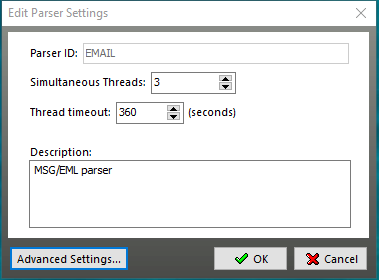
When you press the "Advanced" button the following screen will be displayed:
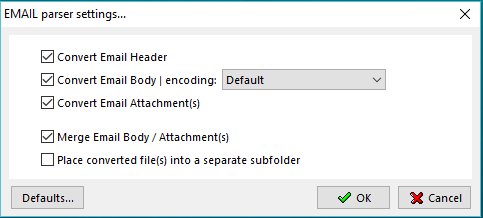
Convert Email Header: preserves the email header in the original email document.
Convert Email Body: preserves the email body in the original email document.
Convert Email Attachments: will convert all attachments in the original email document.
Merge Email Body / Attachments: will merge email body and its attached documents.
Place converted file(s) into a separate subfolder: this option instructs the parser to place each converted email into a separate subfolder.
IMAGE Parser
This parser is used for converting various image formats. It supports multiple threads, so to increase performance make sure you set the number of simultaneous threads to at least 2.
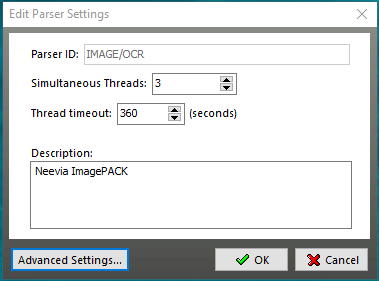
Click the Advanced Settings button to configure the image rotation parameter.
The following settings are available:
l preserve original - will keep the original image rotation/orientation.
l rotate landscape image 90 degress - will rotate landscape images 90 degrees clockwise.
l rotate landscape image -90 degress - will rotate landscape images 90 degrees counterclockwise.
l rotate portrait image 90 degress - will rotate portrait images 90 degrees clockwise.
l rotate portrait image -90 degress - will rotate portrait images 90 degrees counterclockwise.
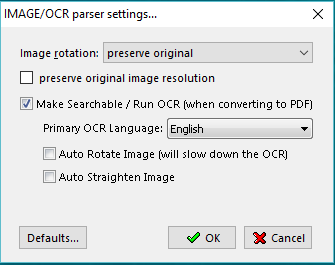
Under the same Advanced Settings interface you can enable Preserve original image resolution (valid only when converting from image to image) and also the Optical Character Recognition feature a.k.a OCR by checking the Make Searchable checkbox.
NOTE: MS Office 2007 or higher must be installed on the same machine with Document Converter in order for the OCR capability to function.
To select your primary OCR language, in the corresponding textbox click the drop down arrow and make your selection.
To force the OCR engine to determine the page orientation check Auto Rotate Image. This will cause the OCR process to become a bit slower.
In case you would like to have the OCR engine correct for small angles of misalignment from the vertical check Auto Straighten Image. This is also called "deskewing" - scanned images may become skewed because of imperfections in the scanning surface, scanning process or simply because the paper was not placed completely flat when scanned.
OPENOFFICE Parser
This parser is used for converting OpenOffice file formats to PDF and/or Image. It supports multiple threads, so to increase performance make sure you set the number of simultaneous threads to at least 2.
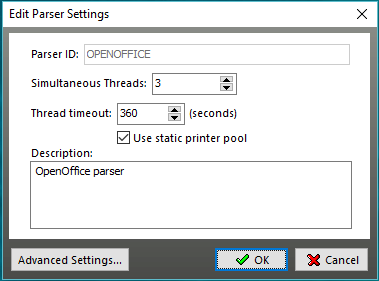
To configure this parser press the Advanced Settings button. The interface below will be dispayed.
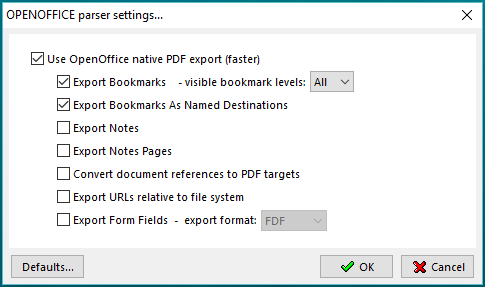
To use the native OpenOffice PDF export engine check the corresponding checkbox. The following options are available:
Export Bookmarks - will convert all existing bookmarks to PDF bookmarks.
Export Bookmarks as Named Destinations - will create a PDF named destination for each bookmark in the original file.
NOTE: a named destination represents a location in a PDF file that can be specified by name instead of by view and page number. The name can then be used destinations of links or bookmarks.
Export Notes - will export comments of Writer documents as PDF notes
Convert document references to PDF targets - will convert the URLs referencing other ODF files to PDF files with the same name. In the referencing URLs the extensions .odt, .odp, .ods, .odg, .odm are converted to the extension .pdf.
Export URLs relative to file system - will export URLs to other documents as relative URLs in the file
system.
Export Form Fields - will export OpenOffice form fields to PDF form fields. As export format you can
specify FDF, PDF, HTML and XML.
NOTE: Libre Office is also supported as a parser.
DESIGN REVIEW Parser
This parser is used for converting Autocad file formats to PDF and/or Image. It supports multiple threads, so to increase performance make sure you set the number of simultaneous threads to at least 2.
In order for Document Converter to properly detect and use this application as a parser you must install both DWG TrueView and Autodesk Design Review. Both viewers can be downloaded for free from Autodesk website.
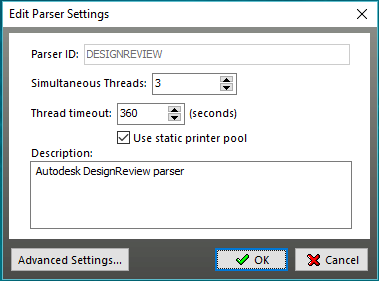
To configure this parser click Advanced Settings.
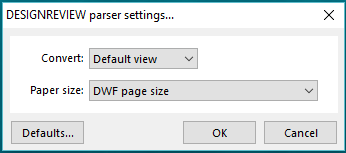
Convert - click the drop down arrow to specify what to convert.
there are four options: Default view, All Layouts, Model Space and Specific Layout.
Paper size - allows you specify the output file paper size. If nothing is selected the parser will use the
paper size of the original document.
File Associations
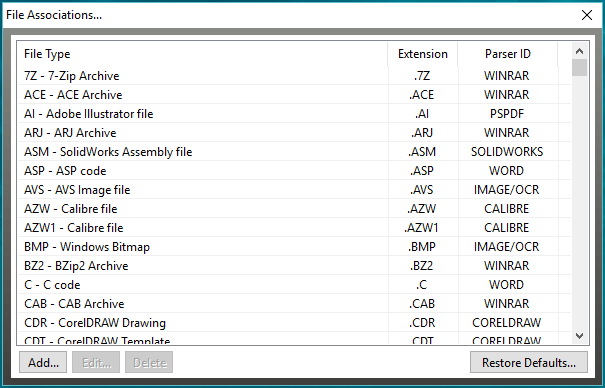
To add a new file extension click Add and type in File type, File extension then click the Parser ID drop down arrow and select the application that you want to use for your new extension. Should you like to delete a particular extension, select it then click Delete. To assign a different parser to an existing file format click Edit and make your change in the Parser ID drop down box. To restore the default file associations simply click Restore Defaults.
NOTE: if an extension is not associated with a parser Document Converter will automatically move the file(s) with that particular extension from the Input folder to the Error folder.
Email Watcher
Document Converter has the ability to convert email messages - this is done through the email watcher feature. To enable Email watcher in Document Converter main screen go Settings -> Email watcher.
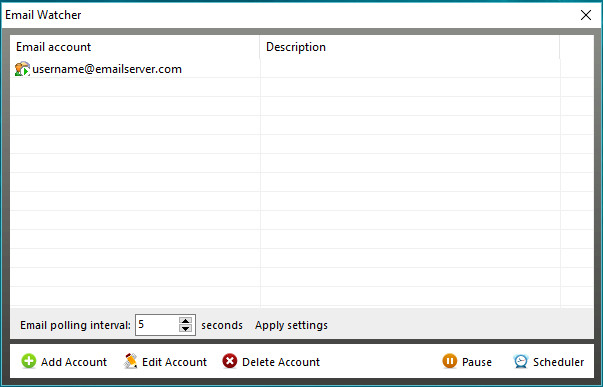
In the screen above you have a list of all email accounts currently defined. On the bottom of the screen there are 5 buttons:
Add Account - use this to add an email account to eMail watcher;
Edit Account - allows you to edit the email account settings;
Delete Account - use this to delete an email account from eMail watcher;
Resume - enables email polling in case it was paused;
Scheduler - you can use this feature to define time intervals for email polling.
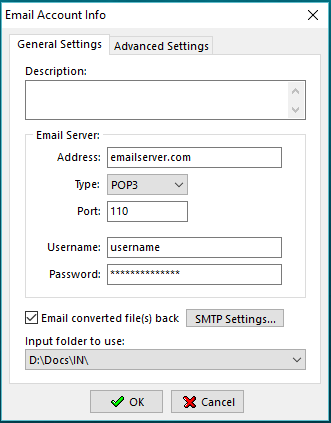
If you select Add Account or Edit Account the following interface will be displayed:
General Settings tab
Address - specifies the incoming email server address. Ex: mail.neevia.com
Type - specifies the type of email server: POP3, POP3-SSL/TLS (with encryption), IMAP, IMAP-SSL/TLS, OAuth 2.0.
Port - specifies the port number depending of the email server type.
Username - specifies the account to scan (this is usually the same as the part of the e-mail address to the left of the "at" sign @). Ex: testaccount.
Password - specifies the password of the email account to watch.
Email converted file back - check this checkbox to have the converted files emailed back to the user. Press the "SMPT Settings" button to specify the outgoing SMTP server settings.
Input folder to use - specifies the Document Converter input folder to use for conversion.
Advanced Settings tab
Max incoming msg size - specifies the maximum incoming message size (in Kilobytes). Messages that will exceed this size will not be converted. Use zero (0) for unlimited.
Leave a copy of message(s) on the server - this option forces Email watcher to leave a copy of each email message it processes on the server.
Message filename - sets the filenaming convention.
SMTP Settings
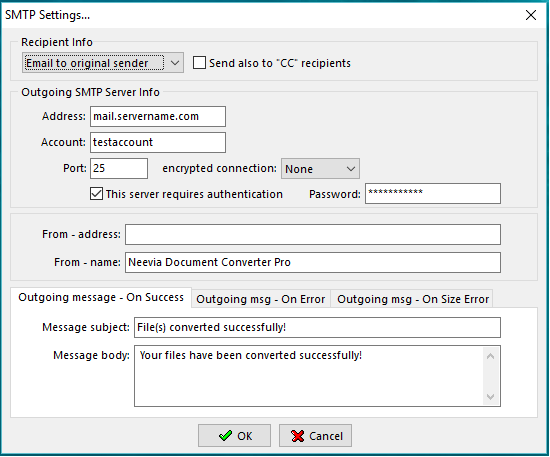
Email to original sender - will send the converted files to where they came from.
Email to original this account - will send all converted file(s) to the specified email account.
Address - specifies the outgoing mail server address. Ex: mail.yourserver.com
Account - specifies the mail account to use for outgoing messages.
Port - specifies the port number - usually 25.
Encrypted connection - you can use None, SSL and TLS, OAuth 2.0 depending on what your email server allows.
This server requires authentication - check this checkbox if the outgoing mail server requires authentication then provide your password.
From - address - type in the email account watched by Document Converter.
From - name - type in the name of converting application, for example Document Converter Pro.
Outgoing message - On Success - in the Subject field type in Converted successfully! or a similar message. If you do not have anything for the Message body simply leave it empty.
Outgoing msg - On Error - in the Subject field type in Conversion Error! or a similar message. If you do not have anything for the Message body simply leave it empty or type in Your file could not be converted!.
Outgoing msg - On Size Error - in the Subject field type in Invalid file size! or a similar message. If you do not have anything for the Message body simply leave it empty or, for example, type in File size was exceeded!.
Advanced Settings Interface
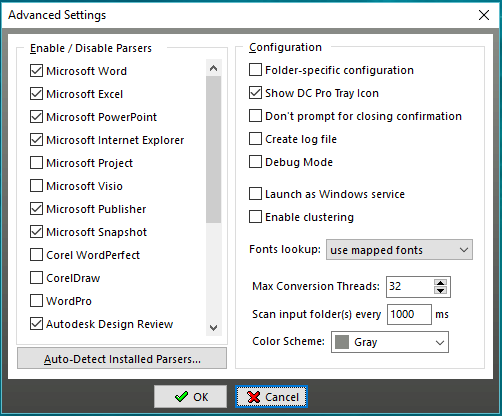
Enable/Disable Parsers
To activate a parser, check its corresponding checkbox and click OK. Make sure that the native application needed for processing your particular file format is installed on the same machine with Document Converter. For example if you select Microsoft Project, this application must be installed otherwise the converter will not be able to detect it as a parser. If you do not want Document Converter to process a particular file format locate the corresponding parser, uncheck it and click OK.
Autodetect installed parsers - when clicked, forces Document Converter to initiate a process of parser detection. Once done, all detected parsers will be active. If you do not want to use one or more of the active parsers simply uncheck them and click OK.
Configuration
Folder-specific configuration - Document Converter Pro 6.x, unlike the previous versions, supports folder specific configurations. This means that you can set different conversion configurations for each input folder DC Pro watches. Once this option is checked you will not be able to change parser configurations directly from the main conversion interface. You will have to click Settings -> Folders -> Document Parsers and select the parser you want to modify.
Show DC Pro tray icon - when checked it shows the Document Converter Pro icon in system tray.
Don’t prompt for closing confirmation - when checked Document Converter will not display an Are you sure you want to close Document Converter Pro notice at closing.
Debug mode - if you select this option Document Converter will run in debug mode.
Create log file - enable this option if you need to have log files created on disk (they will be created in Program files\neevia.com\docConverterPro\Logfiles).
Launch as Windows service - this option will make Document Converter run as a Windows service. Click the Configure button to enter the service Log On account credentials (Username, Password and Startup type). If you want the service to restart Document Converter after a certain number of conversions or conversion errors check the corresponding checkboxes. Once you enable the service close Document Converter and navigate to Control Panel -> Administrative tools -> Services right click on DCStart and select Start. To see what happens during the conversion process navigate to Program Files\Neevia.com\DocConverterPro\ locate dcConfig.exe and launch it.
Enable Clustering - this option enables clustering support in Document Converter.
For more info see the Clustering section.
Fonts lookup - this option instructs Document Converter to look up fonts in its built-in list, mapped list or use installed system fonts.
Maximum conversion threads - this option sets the maximum number of simultaneous conversion threads that Document Converter will allow at any given time.
Scan input folder(s) every... - allows you to define how often Document Converter will scan the input folder for documents. The default value is 1000ms.
Color scheme - use this to select the color scheme for the Document Converter Pro graphic interface.
Clustering
Document Converter supports failover and high-performance clustering. This means you can point several converters installed on different computers to the same input folder and increase the conversion performance.
To enable clustering support in Document Converter go Settings->Advanced and check the "Clustering Mode" checkbox.
Deployment scenario
2-node conversion cluster
Let’s say that you have 2 servers - serverA and serverB and the input/output folders will reside on serverA.
On serverA:
1. create 4 new folders – C:\Docs\In\, C:\Docs\Out\, C:\Docs\Error\ and C:\Docs\Orig\. Share the In, Out, Error and Orig subfolders as \\serverA\in\, \\serverA\out\, \\serverA\error\ and \\serverA\orig\ respectively.
2. install Document Converter Pro and enable clustering support (Settings->Advanced, check the "Enable Clustering" checkbox);
3. define the input folder – in Document Converter go Settings->Folders, press the Add folder button and specify \\serverA\in\ as Folder to scan, \\serverA\out\ as Destination folder, \\serverA\error\ as Error folder and \\serverA\orig\ as Folder for original files.
On serverB:
1. install Document Converter and enable clustering support (Settings->Advanced, check the "Enable Clustering" checkbox);
2. define the input folder – in Document Converter go Settings->Folders, press Add folder and specify \\serverA\in\ as Folder to scan, \\serverA\out\ as Destination folder, \\serverA\error\ as Error folder and \\serverA\orig\ as Folder for original files.
Note: to avoid connection problems make sure that you use UNC names instead of mapped folders when adding remote folders into the main Folder to scan interface.
Conversion performance
Using the configuration described above we were able to achieve a 15%-45% performance increase compared to a single server configuration.
Server configuration:
CPU: AMD FX 8350 4 GHz
RAM: 64 GB
SSD: 1 TB SATA
OS: Windows Server 2019 R2
Office: Microsoft Office 2019
Document Converter Pro V7.5
Word document used - https://neevia.com/prods/sample.doc
VBS script used:
Dim DC : Set DC = CreateObject("Neevia.docConverter")
rv = DC.SubmitFile("C:\sample.doc","")
rv=2
While rv=2
rv = DC.CheckStatus("C:\sample.doc","")
DC.doSleep 300
Wend
If (rv = 0) Then
MsgBox " Converted successfully !!!"
Else
MsgBox " Error converting !!!"
End If
Word parser configuration:
Bookmarks/Hyperlinks processing disabled, 1 simultaneous thread
10 documents used – overall conversion time 29sec, time per document – 2.9sec
Bookmarks/Hyperlinks processing disabled, 2 simultaneous threads
10 documents used – overall conversion time 27sec, time per document – 2.7sec
Bookmarks/Hyperlinks processing disabled, 3 simultaneous threads
10 documents used – overall conversion time 25sec, time per document – 2.5sec
Bookmarks/Hyperlinks processing disabled, 4 simultaneous threads
10 documents used – overall conversion time 23sec, time per document – 2.3sec
Bookmarks/Hyperlinks processing enabled, 1 simultaneous thread
10 documents used – overall conversion time 71sec, time per document – 7.1sec
Bookmarks/Hyperlinks processing enabled, 2 simultaneous threads
10 documents used – overall conversion time 69sec, time per document – 6.9sec
Bookmarks/Hyperlinks processing enabled, 3 simultaneous threads
10 documents used – overall conversion time 63sec, time per document – 6.3sec
Bookmarks/Hyperlinks processing enabled, 4 simultaneous threads
10 documents used – overall conversion time 61sec, time per document – 6.1sec
2-node conversion cluster – each node an AMD Ryzen 7, 4.5 GHz, 16GB RAM, 1 TB SSD
Bookmarks/Hyperlinks processing enabled, 2 simultaneous threads on each node
10 documents used – overall conversion time 54sec, time per document – 5.4sec
Scripting
Neevia Document Converter supports scripting before/after document conversion and on errors. You can use any scripting language you like (and can even mix and match between folders). The following procedures have to be used depending on your scripting language:
VBScript:
Sub onBeginConversion(fileName, docParser, inFolder, outFolder)
This procedure is called after the document type has been established and before the conversion begins
End Sub
Sub onConverted(fileName, docParser, inFolder, outFolder)
This procedure is called after the document was successfully converted
End Sub
Sub onError(fileName, docParser, inFolder, outFolder)
This procedure is called if an error is raised while converting the document
End Sub
JScript:
function onBeginConversion(fileName, docParser, inFolder, outFolder)
{
This procedure is called after the document type has been established and before the conversion begins
}
function onConverted(fileName, docParser, inFolder, outFolder)
{
This procedure is called after the document was successfully converted
}
function onError(fileName, docParser, inFolder, outFolder)
{
This procedure is called if an error is raised while converting the document
}
Example
Create a file c:\test.vbs with the following content:
Sub onConverted(fileName, docParser, inFolder, outFolder)
MsgBox "Your "& filename &" file was successfully converted!!!"
End Sub
Sub onError(fileName, docParser, inFolder, outFolder)
MsgBox "There was an error converting "& filename
End Sub
After that, in Document Converter go Settings->Folders, select the input folder you want to use for testing, press the Edit Settings click the Scripting tab button and specify c:\test.vbs as Script to execute.
Copy several files into the input folder!
Launching Document Converter as a Windows Service
In order to launch Document Converter as a Windows service the following steps should be followed:
· Make sure that you have Document Converter installed on your computer.
· Launch the converter by doing a right click on dconverter.exe and selecting Run as administrator.
- In the main conversion interface click Settings -> Advanced and check Launch as Windows service then click Configure.
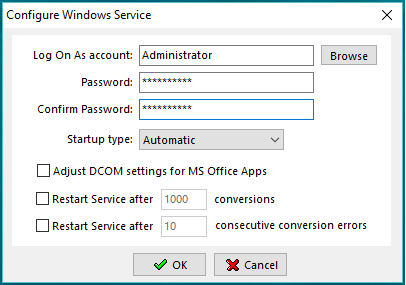
- Click Browse and select the Administrator account and type in the password. As Startup type select Automatic.
- If you do not want Document Converter to automatically adjust DCOM permissions for MS Office parsers uncheck Adjust DCOM settings for MS Office Apps.
- Click OK, go back to the main conversion interface and close Document Converter.
- In Windows open Control Panel -> Administrative Tools -> Services -> right click on dcStart -> click Start.
When Document Converter is launched as a Windows service to see what happens during the conversion process you need to use dcConfig.exe.
For that, in Windows open My Computer or Windows Explorer, navigate to Programs Files ->Neevia.com DocConverterPro -> and run dcConfig.exe.
NOTE: in order to avoid conversion problems when Document Converter runs as a windows service always use an account with local admin rights for the dcStart service, preferably the same local admin account that you were logged on with when you installed the converter. If you decide to use a different account for dcStart make sure you login with that account and manually open/close each parser. This will create registry profiles for the new context and prevent applications from displaying popup windows in the background.
Supported File Formats
This list contains the currently supported file types; additional file types are constantly added. If the file type you are looking for is not listed here please e-mail us at: info@neevia.com.
Generic Formats
Adobe PDF
Adobe PostScript
Encapsulated PostScript (EPS)
ZIP archive
Microsoft Publisher formats (requires MS Publisher to be installed / used as a parser)
Microsoft Visio formats (requires MS Visio to be installed / used as a parser)
Lotus WordPro formats (requires Lotus WordPro to be installed / used as a parser)
Word Processing Formats (requires MS Word to be installed / used as a parser)
ASCII
Text
ANSI Text
Microsoft RTF
Microsoft
Word for PC v2
Microsoft Word for PC v3
Microsoft Word for PC v4
Microsoft Word for PC v5.5
Microsoft Word for Macintosh v4
Microsoft Word for Macintosh v5
Microsoft Word for Macintosh v6
Microsoft Word for Macintosh v98
Microsoft Word for Windows XP/2003
Microsoft
Word for Windows 2007/2010/2013/2016/2019/365
Microsoft Works v1.0
Microsoft Works v2.0
Microsoft Works v3.0
Microsoft Works v4.0
Microsoft Windows Write v1.0
Microsoft Windows Write v2.0
Microsoft Windows Write v3.0
Spreadsheet Formats (requires MS Excel to be installed / used as a parser)
Corel
QuattroPro v7
Corel QuattroPro v8
Lotus 1-2-3 v2
Lotus 1-2-3 v3
Lotus 1-2-3 v4
Lotus 1-2-3 v5
Lotus 1-2-3 96
Lotus 1-2-3 97
Lotus 1-2-3 R9
Microsoft Excel v3/4/5/6
Microsoft Excel 97
Microsoft Excel XP/2003/2007/2010/2013/2016/2019/365
Microsoft Excel for Mac 98
Microsoft Works Spreadsheet v1.0
Microsoft Works Spreadsheet v2.0
Microsoft Works Spreadsheet v3.0
Microsoft Works Spreadsheet v4.0
Presentation Formats (requires MS PowerPoint to be installed / used as a parser)
Lotus
Freelance 1.0-2.1
Microsoft PowerPoint 4.0
Microsoft PowerPoint 95
Microsoft PowerPoint 97
Microsoft PowerPoint XP/2003/2007/2010/2013/2016/2019/2022/365
Microsoft PowerPoint for Macintosh 98
WordPerfect Processing Formats (requires WordPerfect to be installed / used as a parser)
WordPerfect
v5.x
WordPerfect v6
WordPerfect v7
WordPerfect v8
WordPerfect v9/10/11/12/X3/X4
WordPerfect for Macintosh v2
WordPerfect for Macintosh v3
Graphic Formats
AVS - AVS X image file
BMP - MS Windows Bitmap
image file
BMP - OS/2 Bitmap
DCX - ZSoft IBM PC multi-page Paintbrush file
DIB - MS Windows Device Independent Bitmap
DPX - Digital Moving
Picture Exchange
FAX - Group 3 FAX encoding
FITS - Flexible Image Transport System
FPX - FlashPix Format
GIF - CompuServe graphics interchange format
GIF87 - CompuServe graphics interchange format ver 87
ICO - MS Windows Icons
ICO - OS/2 Icons
IPTC
- Newswire
profile
JBIG - Joint Bi-level Image experts Group file interchange format
JP2 - JPEG 2000 JP2 File
Format Syntax
JPEG - Joint Photographic Experts Group JFIF format
JPG - Joint Photographic Experts Group JFIF format
MIFF - Magick image file format
MNG - Multiple-image Network Graphics
MPC - Magick Persistent Cache image file format
MTV - MTV Raytracing image format
OTB - On-the-air Bitmap
PBM - Portable Bitmap
PCD - Kodak PhotoCD - Base/16, Base/4 and Base only
PCDS - Kodak PhotoCD -
Base/16, Base/4 and Base only
PCT - MacIntosh PICT
PCX - PC PaintBrush
PGM - Portable GrayMap
PICT - Apple Macintosh QuickDraw/PICT file
PNG - Portable Network Graphics
PNM - Portable Any Bitmap
PPM - Portable PixelMap
PSD - Adobe Photoshop
P7 - Xv's visual schnauzer format
RAS - Raster Sun Microsystems
RGBA
- Raw
red, green, blue, and matte samples
SGI - Irix RGB image file
SUN - Raster SunMicrosystems
TGA - TrueVision Targa
TIFF - Tagged Interchange File Format
VICAR - V.I.C.A.R. Image file format
VID - Visual Image Directory
VIFF - Khoros Visualization image file
WMF - Windows Meta File
XBM - X Windows system bitmap, black and white only
XPM - X Windows system pixmap file (color)
XWD - X Windows system window dump file (color)
Vector Graphic Formats I (requires Adobe Illustrator v10+ to be installed / used as a parser)
AI - Adobe Illustrator
CDR - CorelDRAW graphics
CGM - Computer Graphics Metafile
DWG - AutoCAD Drawing
DXF - AutoCAD Interchange
EMF - Enhanced Metafile
FLM - Filmstrip file format
FH4 - FreeHand 4
FH5 - FreeHand 5
FH7 - FreeHand 7
FH8 - FreeHand 8
PDD - Adobe Photoshop
PXR - Pixar file format
SVG - SVG file format
SVGZ - SVG Compressed file format
VDA - Targa vda file format
ICB - Targa icb file format
VST - Targa vst fle format
Vector Graphic Formats II (requires CorelDraw v9+ to be installed / used as a parser)
CDR - CorelDRAW graphics
CDX - CorelDRAW compressed
PAT - Pattern File
CDT - CorelDRAW template
CLK - Corel R.A.V.E
CMX - Corel Presentation Exchange
CPX - Corel CMX compressed
AI - Adobe Illustrator
WPG - Corel WordPerfect Graphic
WMF - Windows Metafile
EMF - Enhanced Windows Metafile
CGM - Computer Graphics Metafile
SVG - SVG file format
SVGZ - SVG Compressed file format
PCT - Macintosh PICT
DWG - AutoCAD Drawing
DXF - AutoCAD Interchange
FH4 - FreeHand 4
FH5 - FreeHand 5
FH7 - FreeHand 7
FH8 - FreeHand 8
SHW - Corel Presentations
CAD Formats (requires Autodesk Design Review or AutoCAD to be installed / used as parser).
DWF - Drawing Web Format
DWG - AutoCAD Drawing
DXF - AutoCAD DXF
RML - RedlineXML
IPT - Inventor Part Document
IAM - Inventor Assembly Document
IDW - Inventor Drawing Document
Appendix A: Variables supported by Text / TextBox stamps
Below is the list of variables supported by both Text and TextBox stamps:
%PAGE% - current page number
%PAGES% - total number of pages
%FILENAME% - name of the file
%WEEKDAY% - full weekday name
%WEEKDAY_SHORT% - abbreviated weekday name
%MONTH% - month number (1-12)
%MONTHNAME% - full month name
%MONTHNAME_SHORT% - abbreviated month name
%YEAR% - year with century (YYYY)
%YEAR_SHORT% - year without century (YY)
%DAY% - day of month
%DAY_YEAR% - day of the year (1 -366)
%HOUR% - hour (01- 12)
%HOURS% - hour (00-23)
%MINUTES% - minutes (00-59)
%SECONDS% - seconds (00-59)
%AMPM% - AM, PM
%DATE% - local date representation. Ex: 11/01/07
%TIME% - local time representation. Ex: 1:17:10 PM
%DATETIME% - local date and time
%AUTHOR% - document Author
%TITLE% - document Title
%SUBJECT% - document Subject
%KEYWORDS% - document Keywords
%N% - new line. This is valid for TextBox stamp only.